When voiding a vend with a digital payout, the reward must be canceled before the void can be completed in Baseline.
TABLE OF CONTENTS
Voiding a Digital Payout Vend Invoice
- Navigate to the Invoice and select "Void"
- A popup will appear with a link to Tremendous, you MUST go to Tremendous and cancel the payout from there as well
- Once cancelled in Tremendous, return to Baseline and type "confirmed" to proceed
- Now click "complete" to balance out the void within baseline
- The final confirmation ensures you cancelled the payout within Tremendous
How to Cancel the Payout in Tremendous
- Using the popup link from Baseline, navigate to Tremendous
- Log into Tremendous if prompted
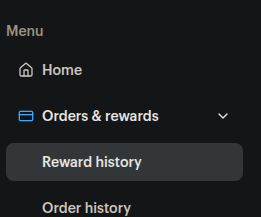
- On the left side of the screen under Orders & rewards select Reward history
- Find the name of the customer that the reward will be canceled for, and click on it
- This will pop up a window on the right side of the screen with the reward information
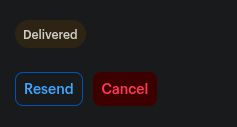
- There will be two buttons side by side, click Cancel to cancel the reward
Was this article helpful?
That’s Great!
Thank you for your feedback
Sorry! We couldn't be helpful
Thank you for your feedback
Feedback sent
We appreciate your effort and will try to fix the article