If a vend with a digital payout needs to be voided, the payout must first be canceled in Tremendous before the void can be completed in Baseline.
TABLE OF CONTENTS
Voiding a Digital Payout Vend Invoice
- Navigate to the Invoice
- Select Void
- A pop-up will appear with a link to Tremendous.
- Opent he link and cancel the payout in Tremendous.
- Return to Baseline and type Confirmed
- Click Complete to finish the Void
Canceling the Payout in Tremendous
- Use the link that appears in the Baseline pop-up to open Tremendous
- Log in to Tremendous if prompted
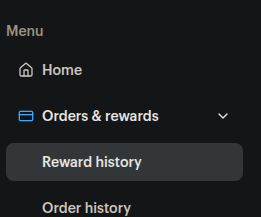
- On the left side of the screen, under Orders & Rewards, select Reward History
- Find the customer's reward and click their name
- A panel will open with reward details
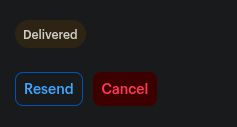
- Click Cancel
For the most up-to-date instructions about cancelling, see Tremendous' Help Article: https://help.tremendous.com/hc/en-us/articles/41472323975443-Cancel-a-reward
Was this article helpful?
That’s Great!
Thank you for your feedback
Sorry! We couldn't be helpful
Thank you for your feedback
Feedback sent
We appreciate your effort and will try to fix the article